Crossbar
4.7 136.00 Reviews
Analysis By AppCompare
Managing youth sports usually means juggling much more than practice itself. There are schedules to remember, people to keep informed, and last-minute changes that can easily get buried in a family group chat. I found Crossbar most useful as a central place for that day-to-day organization. It is a free sports app from Crossbar, designed around youth sports rather than general personal planning.
That focus matters. This is not the kind of app I would choose for tracking a solo workout, comparing running routes, or following professional scores. Its value appears when a child, parent, coach, or team organizer needs the same sports information to be easier to find and act on. The app has a 4.7 average from around 4.3 thousand ratings, and it has passed over 100 thousand installs, which gives it a well-established feel for a family-oriented tool.
Getting from installation to a useful team routine
What Crossbar feels like when you first open it
The first thing I would tell a new user is to think of Crossbar as an organizational hub, not a sports entertainment app. The store places it in the sports category, but the practical experience is closer to a shared team noticeboard and calendar than to a scorekeeping or training application. That distinction prevents a common disappointment: installing it while expecting live game coverage or personal performance analysis.
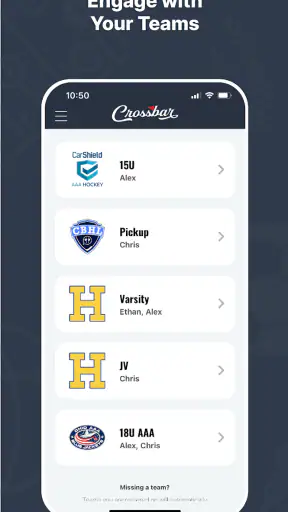
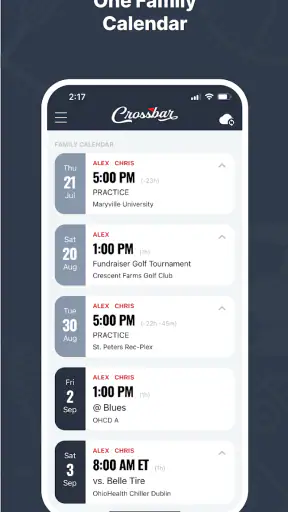
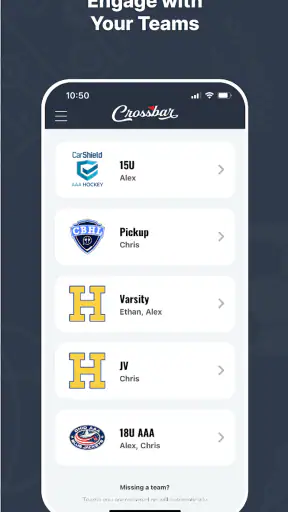
For a parent, the appeal is reducing the number of places to check. Instead of treating a team email, a messaging thread, and a paper schedule as separate sources of truth, Crossbar gives the sports activity a dedicated home. The strongest use case is a family with one or more children involved in organized youth sports, especially when schedules and team communication are recurring responsibilities.
I also like that the app is rated for Everyone. That makes it approachable for households where different people may need access to the same sports information. Still, an age rating is not the same as saying every screen will be equally useful to every person. A young player may mainly need to know when an event happens, while a parent may care more about keeping the broader family routine organized.
The app was released on April 1, 2020, and its current version is 48. Those details suggest a product that has had time to evolve rather than a brand-new experiment. It supports Android 7.0 and later, so owners of older compatible devices may still be able to use it without upgrading their phone solely for this purpose.
Setting up without making the process harder than it needs to be
My advice is to begin with the sports organization or team context you actually need, rather than trying to recreate your entire household schedule immediately. A first-time user can otherwise spend too much time entering information before seeing any benefit. The goal of the first session should be simple: reach the relevant team area and identify the next meaningful event.
Before opening the app, have the basic details of your child’s sports activity nearby. The team name, organization name, or invitation information can make the initial search or connection much smoother. If another parent or coach directed you to Crossbar, use the exact wording they gave you. Youth sports organizations often have similar names, and selecting the wrong result at the start can create unnecessary confusion later.
Once you are in the right place, pause and check whether the schedule looks familiar. This is a small but important habit. Confirming the team before relying on its calendar helps avoid the most frustrating setup mistake: assuming that an empty or incomplete view means the app is not working when the real issue is that the wrong team or account context was selected.
I would also avoid adding every family member or every possible sports activity during the first few minutes. Start with the person who needs the schedule most often. After the first successful check, expand the setup gradually. This approach makes it easier to understand which information belongs to the team and which information is personal household planning.
The first action that proves the app is useful
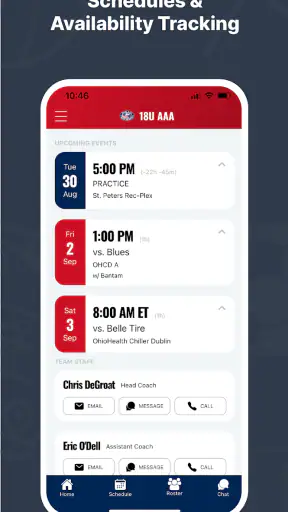
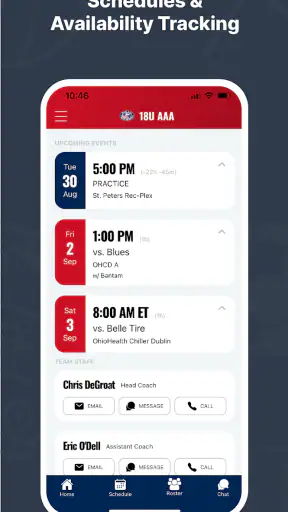
The best first success is not simply opening Crossbar. It is using it to answer a question you would otherwise have had to ask someone else: when is the next practice, game, or team activity, and where should the family look for that information? If the app gets you to that answer quickly, it has already earned a place in your routine.
I recommend testing it with a real upcoming event rather than browsing randomly. Find the next item, read the details carefully, and compare it with the schedule you already have. This gives you an immediate confidence check. It also teaches you how the organization presents information, which is more valuable than memorizing where a particular button sits.
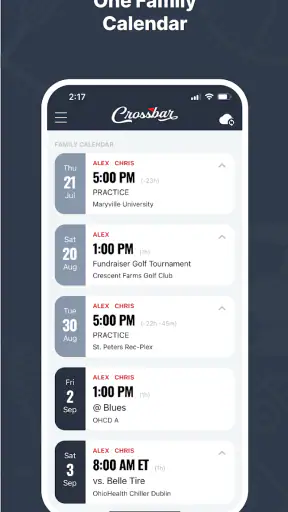
A useful everyday scenario is a parent checking the schedule before leaving work. Instead of searching through old messages, the parent opens Crossbar, checks the next team commitment, and decides whether equipment, transportation, or a change to the evening routine is needed. The app does not remove the responsibility of planning, but it can make the starting point much clearer.
Another practical situation happens when two adults share transportation. One person can use the team information to confirm the plan, while the other avoids relying on a forwarded message that may be out of date. This is where a dedicated sports hub is more dependable than a casual conversation thread: the sports context stays attached to the information.
For coaches and organizers, the first meaningful action may be different. The value comes from checking that the team’s information is visible and understandable to families. A schedule that exists but is difficult to locate still creates work. The more useful test is whether a parent who has never used the app can reach the correct event without needing a separate explanation.
Where new users can become confused
The biggest source of friction is usually not the sports content itself but the relationship between a person, a family, and a team. New users may wonder whether they should create a completely separate setup for every child, whether one household view can cover multiple activities, or whether a team invitation is required before anything useful appears. The right approach is to follow the organization’s chosen structure instead of inventing a parallel one.
It is also easy to confuse a schedule with a complete family planner. Crossbar can help organize youth sports, but I would not treat it as a replacement for every calendar, reminder, or communication tool in the household. If your family needs detailed meal planning, school assignments, commuting reminders, or a shared general-purpose calendar, another app may still be necessary. Crossbar works best as the sports-specific layer of that system.
Another point worth understanding is that the quality of the experience depends partly on how consistently the relevant sports organization maintains its information. An app can present team details neatly, but families still need current details to be entered and updated. If a schedule changes and the team’s information is not refreshed, users may continue to rely on an old plan. I would therefore keep the normal communication channel available until Crossbar has become the trusted place for updates.
Notifications can also create the wrong expectations. A notification is helpful only if it arrives at a useful time and contains enough context to act on. I would not assume that every change will be noticed automatically. Make a habit of checking the team area before an important event, especially during busy weeks or tournaments, rather than treating an alert as a guarantee that nothing has changed.
Finally, remember that a sports app can contain several layers of information. A team schedule, an individual child’s commitments, and a household transportation plan are related but not identical. If something looks missing, first ask whether you are viewing the correct team or person context. That simple check is often more productive than repeatedly refreshing the same screen.
Small workflows that make Crossbar more valuable
One of my favorite ways to use a tool like this is to create a weekly checking habit. I would review the upcoming sports commitments at the beginning of the week, then perform a shorter check before the busiest days. This two-stage routine is better than waiting for a crisis because it catches conflicts while there is still time to arrange a ride or adjust another appointment.
A second useful workflow is to separate confirmation from planning. First, use Crossbar to confirm what the team expects. Then transfer only the information your household needs into whatever broader calendar or reminder system you already use. This avoids copying every detail everywhere, while still making sure the sports commitment appears alongside school, work, and family obligations.
For families with more than one child, I would review each child’s sports context separately before making a combined plan. The trade-off is a little extra attention at the beginning, but it reduces the chance of assuming that one child’s schedule applies to another. When activities overlap, this distinction becomes especially important for transportation and equipment preparation.
A third insight is to use the app as a shared reference during handoffs. If one parent normally handles practices and another handles games, both can check the same sports source instead of depending on memory. This is particularly useful when a child spends time between two households or when a grandparent occasionally provides transportation.
There is also a useful boundary to maintain: do not enter information merely because the app gives you a place to organize it. Keep the team-related details that help you act, and avoid turning the sports hub into a duplicate of every personal note. A focused setup is easier to trust and easier for another family member to understand.
Who will get the most from it
Crossbar is a strong fit for parents who are tired of searching through messages for youth sports details. It is also a sensible choice for coaches or team organizers who want families to have a shared place to begin. The app’s free price lowers the barrier for households that need a practical organizational tool without adding another subscription to the monthly budget.
It should also suit families that prefer a dedicated sports experience over a generic calendar. A normal calendar is flexible, but it often requires manual entry and does not naturally preserve the team context. Crossbar’s advantage is that the sports activity remains connected to the organization and the people involved, rather than appearing as an isolated event with a short title.
On the other hand, I would skip it if you are looking for fitness tracking, detailed athletic statistics, live professional sports coverage, or a private training diary. Those needs call for different categories of apps. I would also hesitate if your team does not use the platform consistently, because the benefit of a shared hub depends on the community around it.
Families who already have a reliable calendar and communication process may see less immediate value. In that case, Crossbar is worth adding only if it reduces duplication rather than creating another place to monitor. The test is straightforward: after setup, does it save you time locating youth sports information? If it does not, a general calendar may remain the simpler choice.
How it compares with the usual alternatives
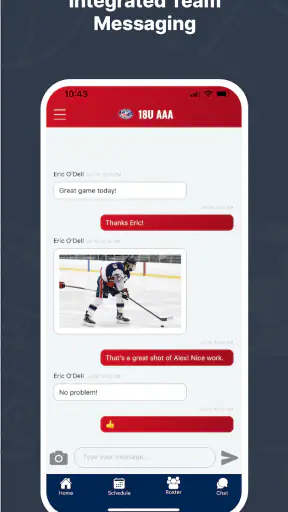
The most common alternative is a group chat. Chats are fast and familiar, but important details disappear as new messages arrive. Crossbar is better for finding the sports information itself, while a chat may still be better for quick conversation or last-minute questions. I see them as complementary until the team has a clear routine for where official details belong.
Email has a similar weakness. It creates a written record, but schedules can be spread across several messages, forwarded notices, and attachments. A dedicated sports app makes the information easier to approach as an ongoing activity rather than a collection of announcements. The trade-off is that every family member must learn to check the app.
A general calendar is the strongest alternative for people who want one place for absolutely everything. It is often excellent for reminders and personal planning, but it may require someone to copy sports events manually. Crossbar is more specialized, so it can reduce that manual work when the organization and family are using it properly. The general calendar remains better for combining sports with school, medical appointments, work shifts, and household tasks.
Paper schedules still have one advantage: they are visible without opening a device. I would not abandon a printed schedule for a major event if a family member depends on it. My preferred arrangement is to use Crossbar as the current reference and a simple written note as a backup for the day’s immediate logistics.
What to do after the first week
After the initial setup, the next step is not to explore every possible area. It is to decide how Crossbar fits into your existing routine. Choose one regular review point, such as the start of the week, and one quick check before the next event. This gives the app a clear job and makes it easier to notice whether it is genuinely reducing stress.
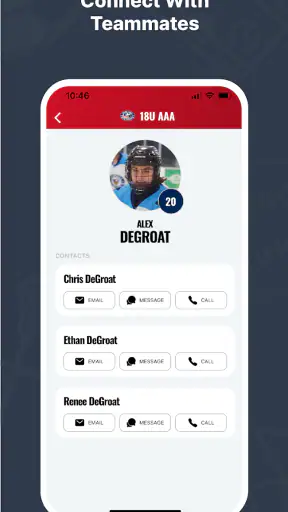
Then involve the person who will actually use the information. If that is another parent, show them the path to the relevant team rather than simply telling them that the app is installed. If it is a player, explain which details matter to them and which planning decisions remain the adults’ responsibility. A shared tool becomes useful only when the people who need it can reach the right information independently.
Keep your expectations realistic during the transition. You may still receive messages, emails, or verbal updates while everyone adjusts. Rather than treating that overlap as failure, use it to identify which source is current and which information should be checked in Crossbar. Over time, a consistent team habit can make the app much more valuable than it appears during the first launch.
In my experience, the strongest reason to recommend Crossbar is not that it tries to do everything. It gives youth sports a focused organizational home, which can make recurring family logistics less scattered. The free model, Everyone rating, and support for Android 7.0 and later make it easy to try for many households, while its 4.7 average shows that it has resonated with a substantial user base.
My final view is positive but practical: install it when your youth sports organization or team is ready to use it as a shared reference. Start with one child and the next real event, verify that the information is correct, and build a weekly checking habit before expanding. If you need a complete household planner or advanced sports analysis, choose a broader or more specialized tool instead. For families trying to turn youth sports schedules into something easier to find and manage, Crossbar is a sensible place to begin.
FAQ
What is Crossbar and what can I use it for?
Crossbar is an app designed to help users connect, communicate, or manage activities through a centralized mobile experience. Its exact usefulness depends on the services and features available in your region, so it is worth reviewing the current app description before downloading. After installation, the main screen generally guides you toward creating an account, exploring available options, and adjusting your preferences.
Is Crossbar free to download and use?
Crossbar may be available to download at no initial cost, but some features or services could require payment, a subscription, or an account connected to an organization. Before confirming any purchase, check the pricing information shown in the App Store or Google Play and review the in-app payment details. Availability and costs can vary depending on your country, platform, and the version installed.
Does Crossbar require an account or personal information?
You may need to create an account to access the complete Crossbar experience, especially if the app is used for communication, membership management, bookings, or other personalized services. Registration can involve information such as your name, email address, phone number, or organization details. Read the privacy policy and permission requests carefully so you understand how your information is collected and used.
Is Crossbar available for both Android and iPhone?
Crossbar’s availability depends on the specific version and the developer’s distribution plans. Look for the official listing on Google Play for Android devices or the App Store for iPhone and iPad. Before downloading, confirm that the publisher name is correct, your device meets the minimum operating-system requirements, and the app is supported in your location.
What should I check before downloading Crossbar?
Before installing Crossbar, review recent user ratings, update history, required permissions, privacy information, and any subscription terms. Make sure you have enough storage space and a stable internet connection, since some functions may depend on online access. It is also useful to verify whether the app is intended for general users or requires an invitation, membership, or connection to a specific organization.
Pros
- Simple interface makes core features easy to find.
- Useful for organizing and tracking crossbar-related activities.
- Runs smoothly on most modern Android and iOS devices.
- Helpful notifications can keep users updated on relevant activity.
- Compact design uses little storage and mobile data.
Cons
- Some features may require an account or personal information.
- The app’s usefulness depends on having an active user community.
- Limited customization may disappoint advanced users.
- Notifications can become distracting if not configured carefully.
- Performance may vary on older phones or slower connections.